 Sort ingredients
 uberjonas
 QR Code
 Listen
 Pdf
Pdf
Bring a large pot of water to a boil, add some salt, add the pasta and cook per the package instructions until al dente.
Drain the cooked pasta and set aside in a colander. You can add some olive oil to it so it doesn't stick together.
While the pasta cooks, place a skillet over high heat and add the olive oil, and ¼ cup butter. Add the chicken and season with some sale and pepper. Cook the chicken until golden on both sides.
Cover the pan with a lid and reduce heat to medium, continue to cook the chicken for about 5 minutes more, until no longer pink in the center. Remove the chicken from the pan on a plate and cover it with foil.
While the chicken rests, work on the sauce, and make sure you don't forget about the pasta, don't overcook it.
Melt the remaining ½ cup butter in a large skillet over medium heat. Next, add the garlic, cook stirring for 30 seconds. Reduce the heat to low and add a bit of salt and pepper.
After that, add the flour and stir quickly until it forms a paste. Then, VERY SLOWLY while continuing to stir all the time, pour in the heavy cream. Make sure to stir constantly until the sauce is smooth.
Cook the sauce until steaming and thickened. Then add the ½ cup of Parmesan cheese and stir until melted. Taste and adjust for salt and pepper. Remove the pan from the heat.
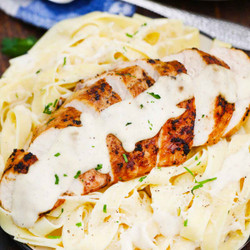
When ready to serve, slice the chicken into strips, add pasta to serving bowls, top it with the chicken and pour a good amount of Alfredo sauce on top.
Garnish with freshly chopped parsley and the remaining Parmesan cheese. Serve and enjoy!